To write a CLAUDE.md, start Claude Code in your project and run /init: Claude reads the codebase and writes a starter file with build commands, structure and conventions. Then edit it with /memory, keep it under 200 lines, and write every rule so it can be checked, such as “Run npm test before committing” instead of “Test your changes”.
CLAUDE.md is a plain Markdown file that Claude Code reads at the start of every session. It is where you write down what you would otherwise explain again each time. This guide is for engineers and tech leads setting up a repository. You need Claude Code installed and a project folder.
Where CLAUDE.md lives
| Scope | Location | Shared with |
|---|---|---|
| Project | ./CLAUDE.md or ./.claude/CLAUDE.md |
The team, through git |
| Local | ./CLAUDE.local.md (add it to .gitignore) |
Only you, this project |
| User | ~/.claude/CLAUDE.md |
Only you, every project |
| Managed | A system folder set by IT | Everyone in the organization |
All files that apply are combined, not swapped. The project file loads after the user file, so it is read later.
How to write CLAUDE.md
- Run
/initin your project. Startclaudein the repository root, type/initand press Enter.
/init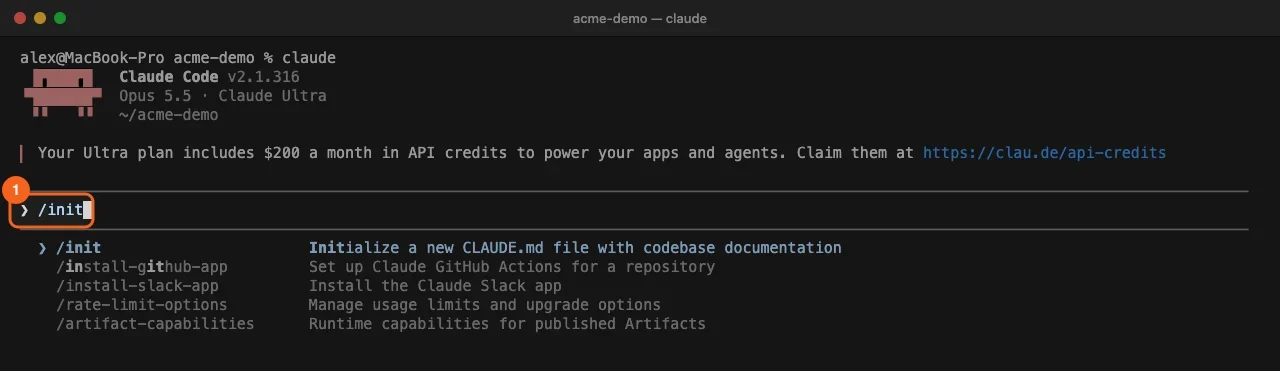
- Read what
/initwrote. Claude explores the project, runs a check where useful and creates CLAUDE.md in the repository root. Its summary lists the sections: commands, setup notes, architecture and project settings. The file is left uncommitted. If a CLAUDE.md already exists,/initsuggests improvements instead of overwriting it.
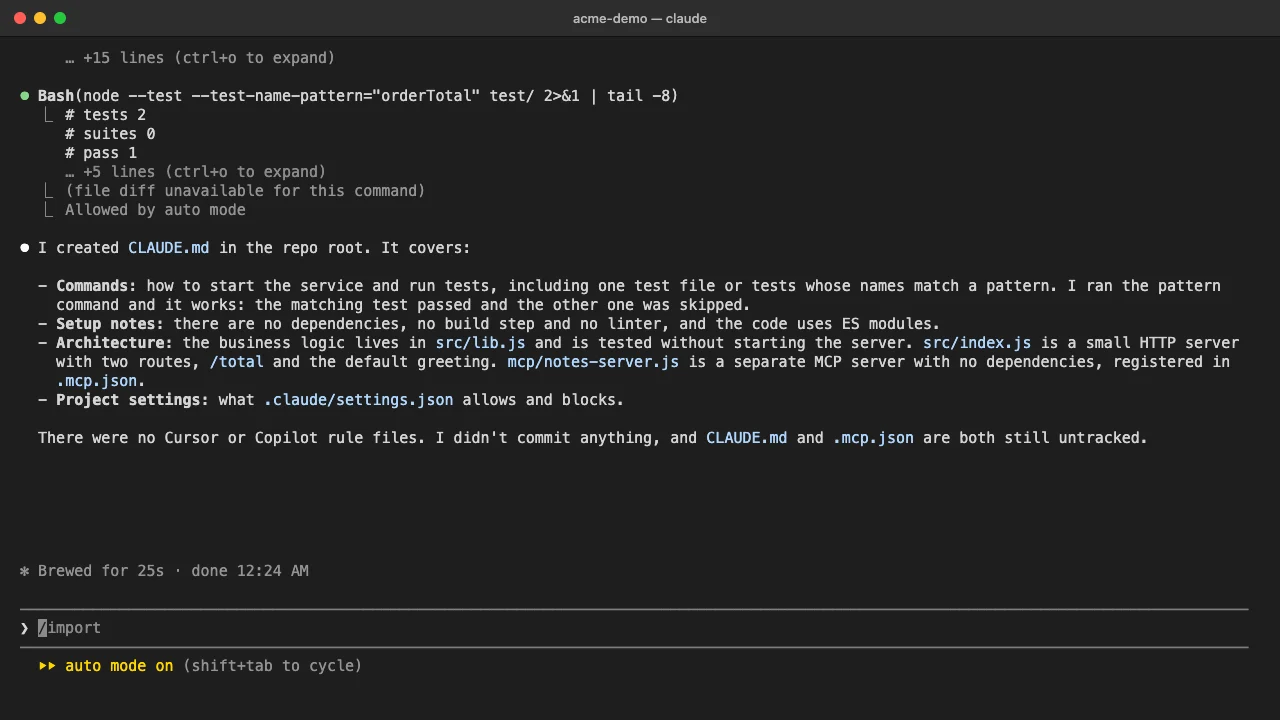
- Open the file with
/memory. Type/memoryand press Enter. The menu describes it as editing CLAUDE.md files and memory settings.
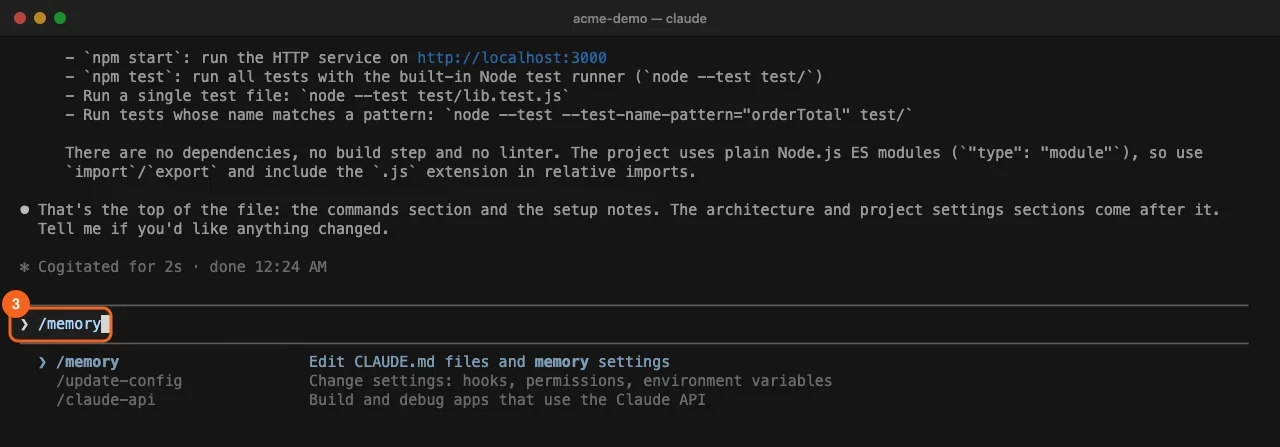
- Choose Project instructions. The Memory menu shows the Auto-memory toggle, Project instructions (checked in at
./CLAUDE.md), User instructions (saved in~/.claude/CLAUDE.md) and Open auto-memory folder. Select Project instructions and press Enter. The file opens in your editor; a terminal editor such as Vim takes over the terminal until you exit.
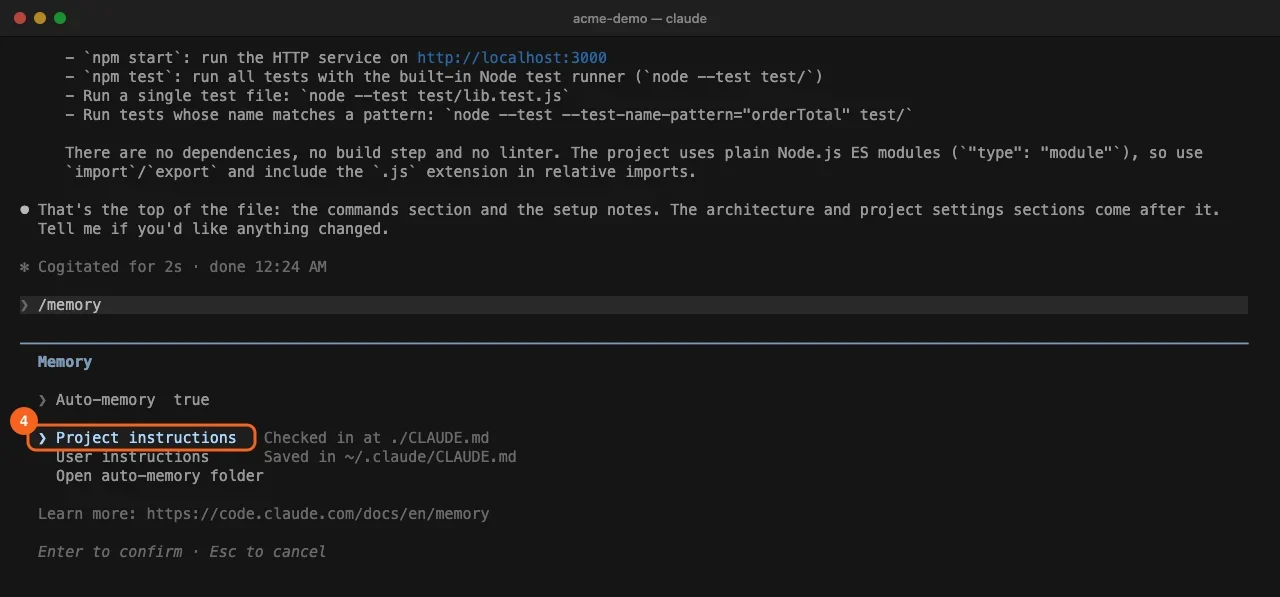
-
Rewrite the content with the rules below. Keep build and test commands, conventions that differ from tool defaults, and “always do X” rules. Cut what Claude can read from the code itself, such as directory listings and dependency lists. Use the template in the next section as a shape.
-
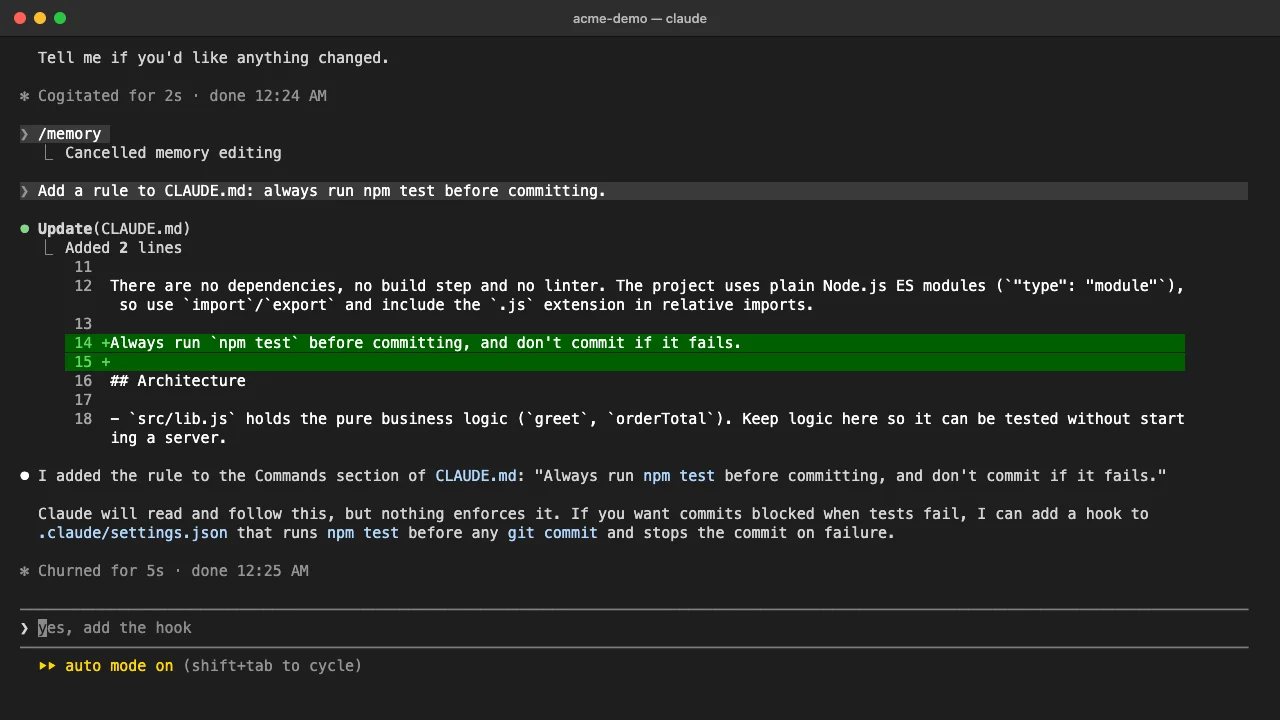
Add rules as you go. When Claude repeats a mistake, ask it to add the rule. It edits the file and shows the new lines as a diff. Claude also notes that nothing enforces a CLAUDE.md rule and offers a hook for anything that must always run.
Add a rule to CLAUDE.md: always run npm test before committing.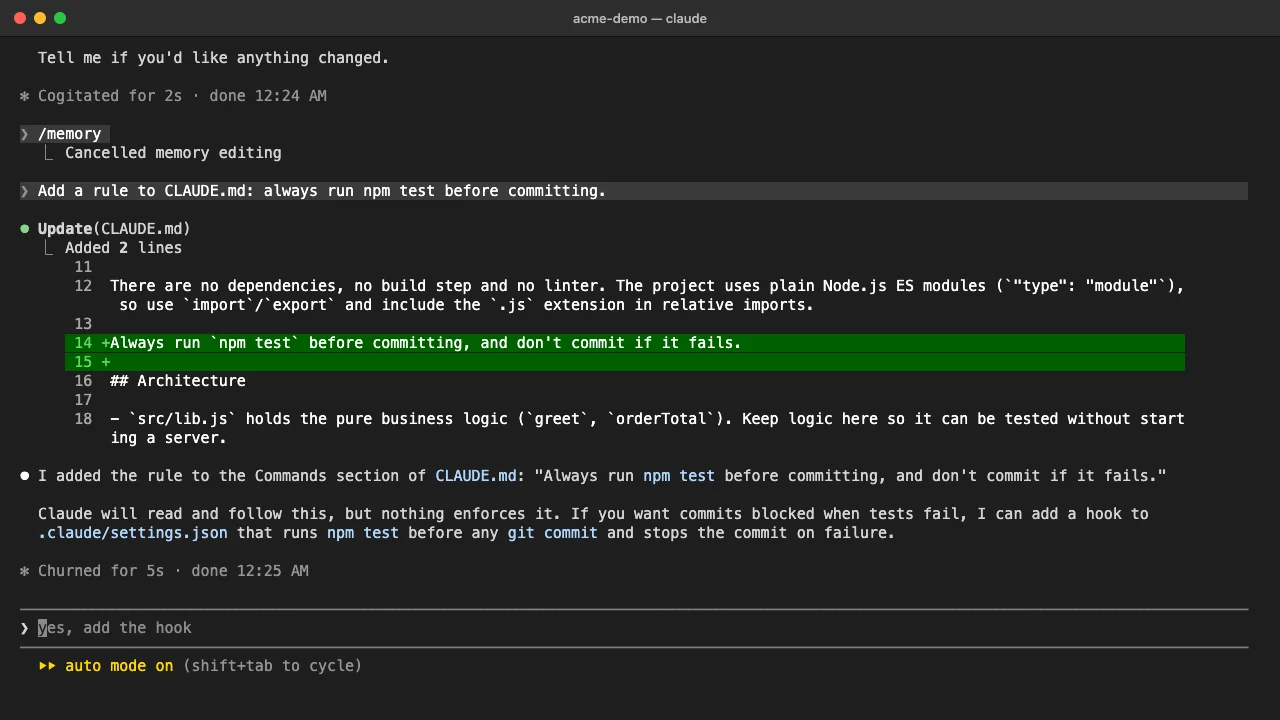
- Commit it and check that it loaded. Commit CLAUDE.md so the team gets it, then start a new session and run
/context. The file should appear in the Memory files list.
git add CLAUDE.md
git commit -m "Add CLAUDE.md"
A CLAUDE.md template
# CLAUDE.md

## Commands
- `npm start`: run the service on http://localhost:3000
- `npm test`: run all tests
- Run one test file: `node --test test/lib.test.js`

## Conventions
- Use 2-space indentation
- API handlers live in `src/api/handlers/`
- Run `npm test` before committing, and do not commit if it fails

## Architecture
- Business logic lives in `src/lib.js` so it can be tested without a server
- See @README for the project overview
Rules for a CLAUDE.md that works
- Be concrete. “Use 2-space indentation” beats “Format code properly”. “API handlers live in
src/api/handlers/” beats “Keep files organized”. - Stay under 200 lines. Longer files use more context and are followed less closely. Claude Code skips a file over 4 MiB entirely.
- Use headers and bullets. Grouped rules are easier for Claude to follow than dense paragraphs.
- Remove conflicts. If two rules disagree, Claude may pick either one.
- Move the rest out. Multi-step procedures belong in a skill. Rules for one part of the code belong in
.claude/rules/with apathsfield, so they load only when Claude works on matching files. - Import, do not paste.
@READMEor@docs/git-instructions.mdpulls a file in, up to four hops deep. Imports keep the file tidy but still count toward context. - Hide maintainer notes. Block-level HTML comments are stripped before the file reaches Claude, so notes for people cost no tokens.
Why Claude is not following your CLAUDE.md
- The file did not load. Run
/contextand look under Memory files. A CLAUDE.md in a subfolder loads only when Claude works on a file there, so it is not listed at launch. - The rule is vague or conflicts with another. Rewrite it so it can be checked and remove the competing line.
- The rule must always run. CLAUDE.md is context, not enforcement. Use a hook for anything that has to happen before every commit or after every edit.
- The file has grown stale.
/doctor prompt-audit(version 2.1.283 or later) reports outdated or conflicting instructions and changes nothing until you approve.
AGENTS.md and other tools
If your repository already has an AGENTS.md and no CLAUDE.md, Claude Code (version 2.1.277 or later) reads the AGENTS.md. To keep one shared file, put @AGENTS.md at the top of CLAUDE.md and add Claude-specific rules below it. /init also folds in Cursor and Copilot rule files it finds.
Rolling out CLAUDE.md across a team
When 20 people write their own instructions, the rules land in personal ~/.claude/CLAUDE.md files, and Claude behaves differently on every laptop. The project file grows into a 600-line dump that contradicts itself, and nobody owns it.
What to standardize:
- One project CLAUDE.md in git, reviewed in pull requests like code, with a named owner.
- Personal notes in
CLAUDE.local.md, so they never reach the shared file. - Organization guidance in a managed CLAUDE.md, and enforcement through managed settings such as
permissions.deny. - A trigger for edits. Claude makes the same mistake twice, or a code review catches something Claude should have known: that is a CLAUDE.md line.
For the wider setup around this file, see how to make a harness for a project in Claude Code and how to save context in Claude Code.
Frequently asked questions
Where should CLAUDE.md be located?
Put the team file at ./CLAUDE.md or ./.claude/CLAUDE.md in the project root and commit it. Personal rules for all projects go in ~/.claude/CLAUDE.md, and personal rules for one project go in ./CLAUDE.local.md.
How long should a CLAUDE.md file be?
Anthropic recommends under 200 lines per file. Longer files cost more context on every request and lower how closely Claude follows them, so move detail into skills or .claude/rules/.
What is the difference between CLAUDE.md and auto memory?
You write CLAUDE.md, and it holds rules and instructions. Claude writes auto memory, which holds its own notes on your preferences and corrections. Both load at the start of every session.
Does /init overwrite an existing CLAUDE.md?
It does not. When a CLAUDE.md already exists, /init suggests improvements instead of replacing the file.
Train your whole team on Claude
Your team is figuring this out one at a time. We train them together in a day.